Metrics & Analytics
Use the Metrics module to review local KPI cards, filtered request logs, session records, event streams, and exportable analytics data.
What Metrics Does
Metrics is KeyRing's local analytics workspace. It reads from the desktop app's local metrics data and turns that data into KPI cards, filterable tables, and exports.
Local dashboard
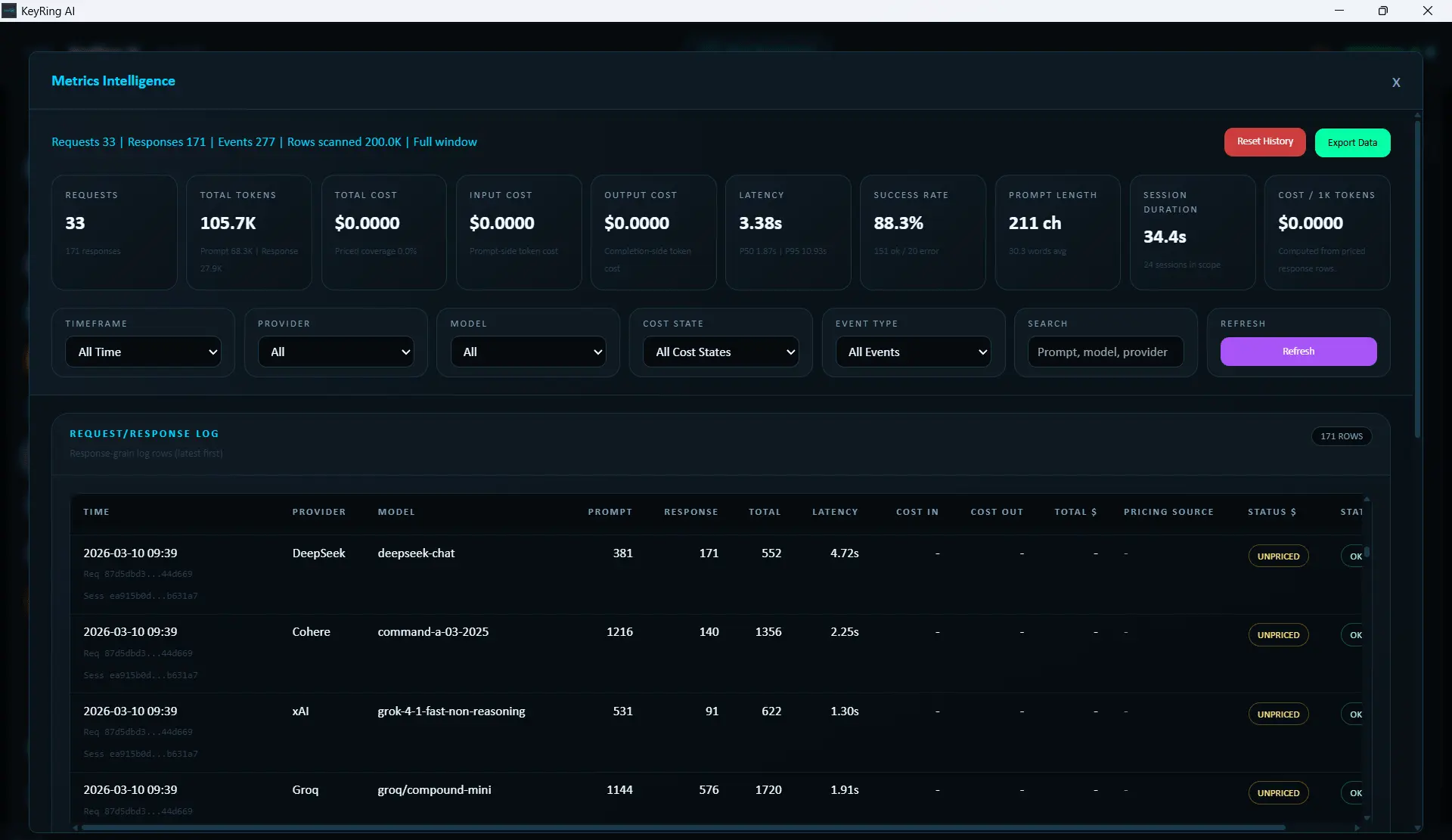
Layout
- Top action area
- Filter row
- KPI cards
- Five main data tables
Top actions currently include Reset History and Export Data.
KPI Cards
The KPI row reflects the current filter state, so the numbers update based on timeframe, provider, model, cost state, event type, and search query.
Filter Row
The current filter controls are Timeframe, Provider, Model, Cost State, Event Type, Search, and Refresh.
- Timeframe options: Last 24 Hours, Last 7 Days, Last 30 Days, All Time
- Search is slightly debounced before the workspace reloads
- Refresh forces an immediate reload
Choose a timeframe first
Start broad, then narrow.
Filter by provider or model
Use provider/model filters when investigating one stack.
Use cost state or event type if needed
These help separate reconciled, estimated, unpriced, or event-specific records.
Use Search for final narrowing
The text search is best used after timeframe and provider/model filtering.
The Five Main Tables
Request / Response Log: row-level request details such as timestamp, request ID, provider, model, tokens, latency, cost status, and error code.
Sessions: grouped activity by session, including artifact chips such as JSON, Transcript, or Chatroom.
Events: event stream view for correlating event type, source, related session, and related request.
Model Stats: model-level usage, cost, latency, and success characteristics.
Provider Cost Efficiency: higher-level provider cost and latency comparison.
Artifact chips
Exporting Data
The Export Data menu follows the current filter state.
- Filtered CSV for spreadsheet-friendly export
- Filtered XLSX for richer spreadsheet workflows
- Raw JSON for the most direct programmatic representation
Reset History
Reset History is the destructive action in this module. Use it only when you intentionally want to clear the stored metrics history from your local analytics record.
Recommended Workflow
- Start with All Time if you are trying to understand overall usage.
- Narrow to a timeframe if the data is too broad.
- Filter by provider or model when investigating one stack.
- Use Request / Response Log for exact row-level review.
- Use Sessions for grouped run history.
- Export the filtered view if you need an outside record.
Troubleshooting
Common issues
- Numbers look lower than expected: Check the active filters first.
- Clicked an artifact chip and nothing opened: Current behavior is path copy, not automatic open.
- Need the rawest export: Use Raw JSON.