Who it is for
Builders, researchers, operators, writers, and power users who compare model outputs, manage provider API keys, and need repeatable AI workflows.
Stop hopping between browser tabs and trusting cloud-based middlemen. Query 10+ providers in parallel, run autonomous roundtable debates, and orchestrate 200+ models from a secure desktop environment that never touches our servers.
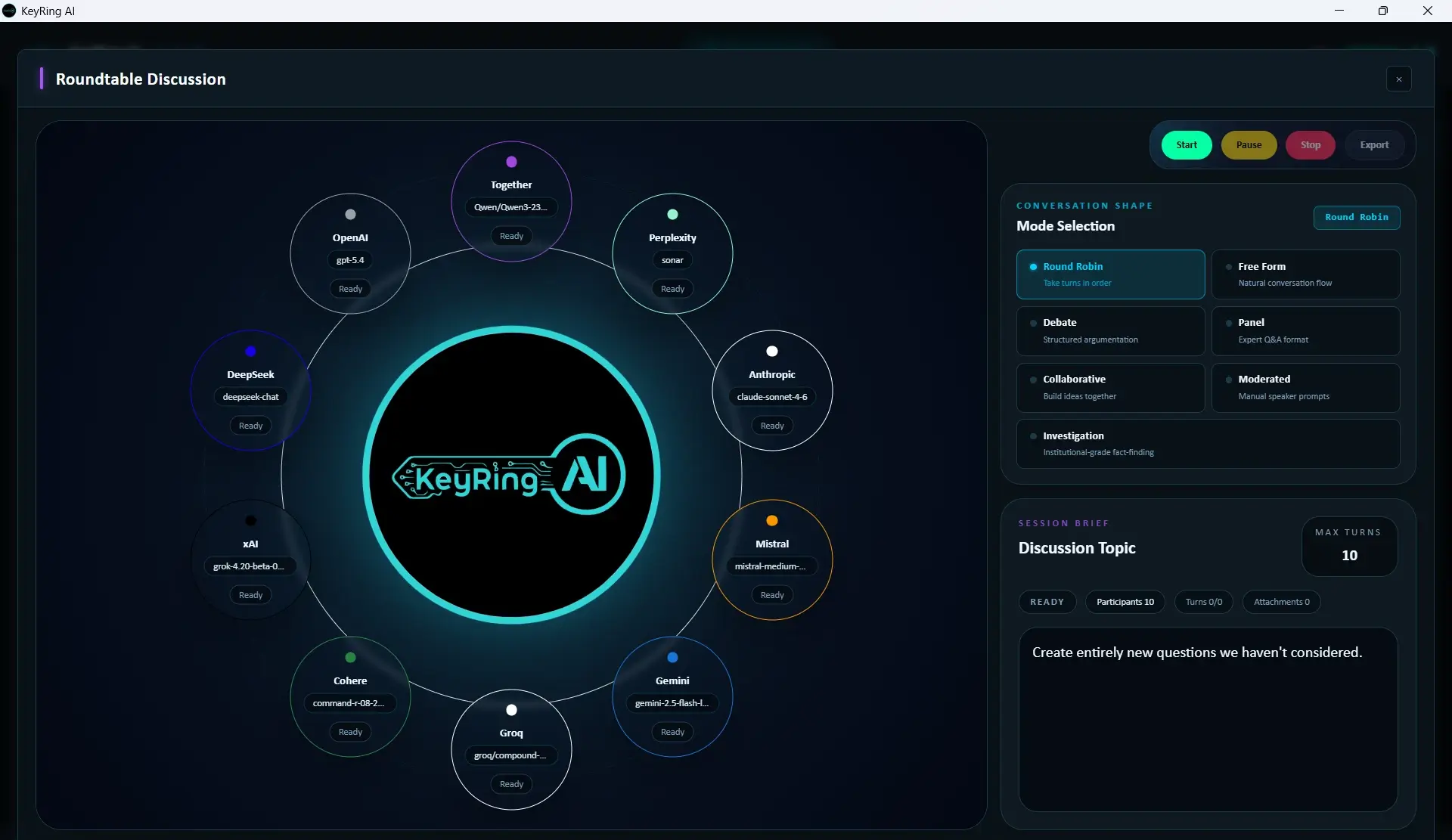
Coordinate structured multi-provider sessions with shared context, moderation controls, and live orchestration.
KeyRing is a local-first desktop app that connects directly to 10 chat and model providers plus ElevenLabs voice using your own API keys. Your prompts go straight from your machine to OpenAI, Anthropic, Google, etc. - we're not in the middle.
Your prompts → AI provider (direct) - no relay server, no KeyRing cloud
API keys held in your OS credential vault - bound to your Windows account, never on our servers
Verify it yourself - open a network monitor during any session
This is the actual KeyRing workspace - running locally on your machine. Every request goes direct to the provider you select.
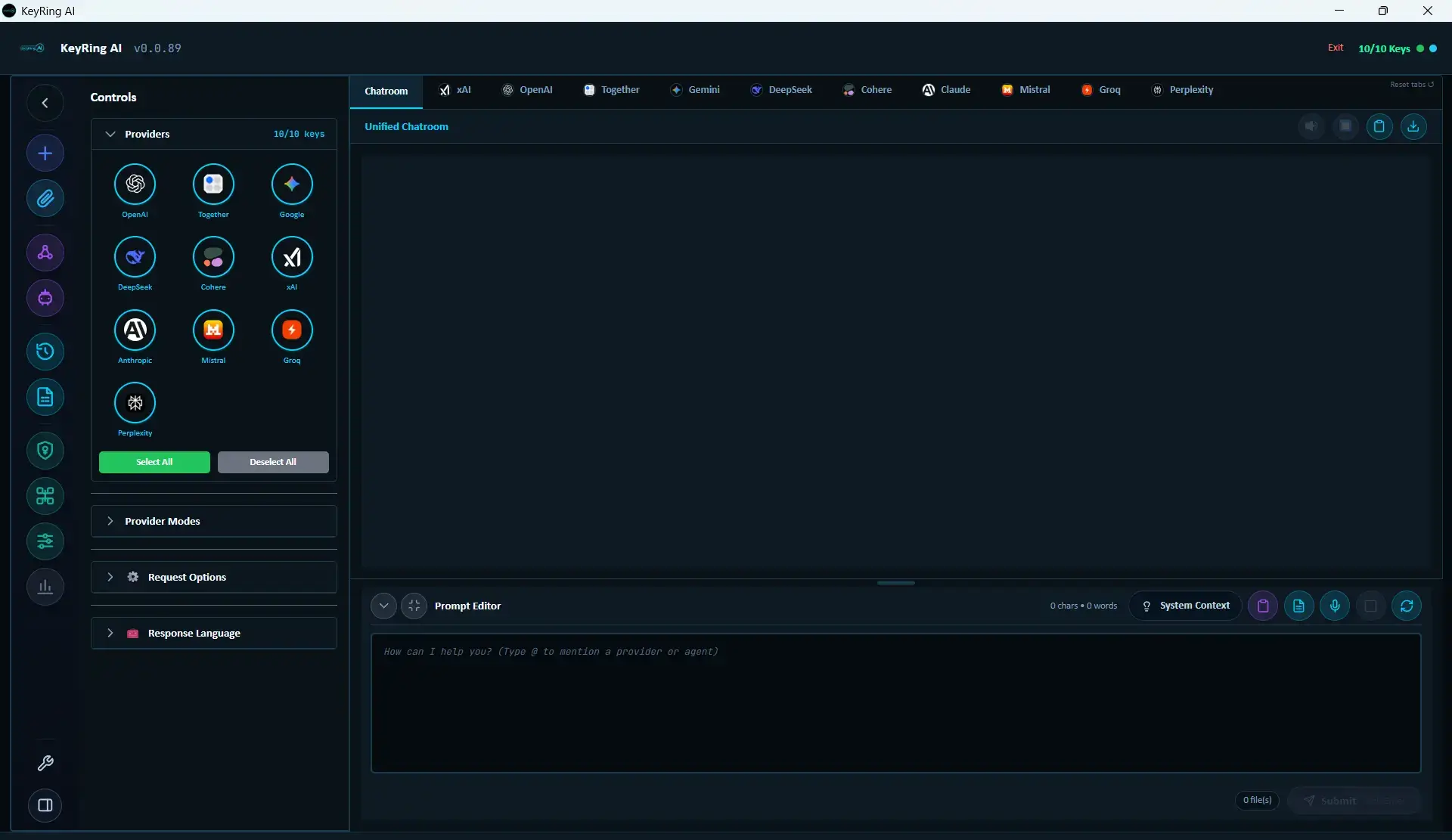
Direct from your desktop to the provider you choose. Open a network monitor - verify it yourself.
Windows Credential Manager, bound to your account. Copy our data folder - no keys come with it.
Shortest path: your machine → provider API. No queue, no processing delay.
You can verify this directly in a network monitor: prompt traffic should go to the provider you selected, not through keyringlabs.com.
Unified access to the world's leading AI providers




KeyRing does not stop at prompt dispatch. Generated media can render directly inside the response timeline, so review happens in the same desktop surface where the work started.
Generated Video In-App Playback
Real capture from the desktop app showing a generated video rendered inside the chat workspace.
Provider-generated output displayed in-app
Playback inside the chat response area
No dashboard hopping to inspect results
Flagship Feature
Roundtable: Structured multi-provider deliberation
Coordinate structured multi-provider sessions with shared context, moderation controls, and live orchestration.
AI Providers
10
AI Models
200+
Roundtable Modes
7
Built-In Tools
30+
Roundtables
Run structured multi-model debates with seven deliberation modes. Each session produces a full multi-turn transcript you can pause, resume, interject in, and export.
Parallel Querying
Send one prompt to multiple providers simultaneously. Compare responses side-by-side in the chat timeline — no switching tabs or browser windows.
Agent Builder
Build named agents with custom system prompts, model selection, and 30 built-in tools across web search, file operations, code execution, image generation, system access, and data processing. Save as reusable configurations.
Metrics Intelligence
Track cost, latency, token usage, and success rate per provider and model. Five summary tables and ten infographic types — burn charts, heatmaps, Pareto frontiers, histograms — with recosting and export to JSON, CSV, or XLSX.
Attachments + Presets
Attach files (PDF, DOCX, XLSX, CSV, code, text — up to 10 MB, 24 files per request) scoped globally or per-provider. Save reusable prompt presets with tags and search.
Local-First Workspace
Conversations, generated images, videos, and TTS audio save automatically to local folders on your machine. API keys are held in your OS credential vault, bound to your Windows account. Export conversation history in Markdown, JSON, or JSONL at any time.
Quick Product Readout
KeyRing AI is a Windows desktop workspace for people who use multiple AI providers and want direct provider routing, local data storage with OS-backed key custody, reusable prompts, and side-by-side model comparison without a cloud relay.
Builders, researchers, operators, writers, and power users who compare model outputs, manage provider API keys, and need repeatable AI workflows.
Provider API keys, conversations, generated files, attachments, metrics, and prompt presets live in the desktop runtime rather than a KeyRing-hosted chat service.
The website handles accounts, billing, license validation, downloads, update metadata, docs, pricing, and support. Normal prompt traffic stays outside the website runtime.
More Workflows
Real screenshots from the current desktop app across core operator workflows.
Click any screenshot to expand
Configure tool access and capability scope inside the agent builder without leaving the desktop runtime.
Tune model behavior with profiles, presets, and per-provider execution controls.
Track request volume, latency, prompt length, and cost signals in a dedicated analytics module.
Review generated media directly inside the chatroom instead of jumping between provider dashboards.
Four simple steps to unlock the full power of AI orchestration.
$29.99/month or $290/year for full access to every provider and every feature. The first 1,000 subscribers get 50% off for their first 24 months, applied automatically at checkout.
Download KeyRing AI for Windows. Install in minutes - no admin account needed. Enter your license key on first launch. macOS and Linux coming soon.
Bring your own API keys from any supported provider. They are encrypted locally - KeyRing servers never receive your provider keys.
Send prompts to one or many providers simultaneously. Compare responses, run roundtable workflows, and generate media from one interface.
Each page below answers one question before you install: what it does, what it costs, how it runs, and where your data goes.
Chatroom, Roundtable, agents, analytics, attachments, and media generation — each with a dedicated surface in the desktop app.
$29.99/month or $290/year for full access, provider API key costs billed directly by each provider, and the founding-member 50% discount terms.
Current Windows release, installer formats, system requirements, and the macOS and Linux release tracks.
Installation walkthrough, provider key configuration, license activation, and module-specific usage guides.
Free copyable, downloadable, and KeyRing-importable prompt presets for writing, coding, debugging, research, marketing, tutoring, and business strategy.
Tauri shell, local Python backend, React frontend, and website layer — the full stack, documented for review.
Local runtime trust boundary, API key encryption at rest, hardware-bound license verification, and the direct provider request path.
Subscribe now to lock in half-price for your first 24 months.
Secure checkout via Stripe. Cancel anytime.